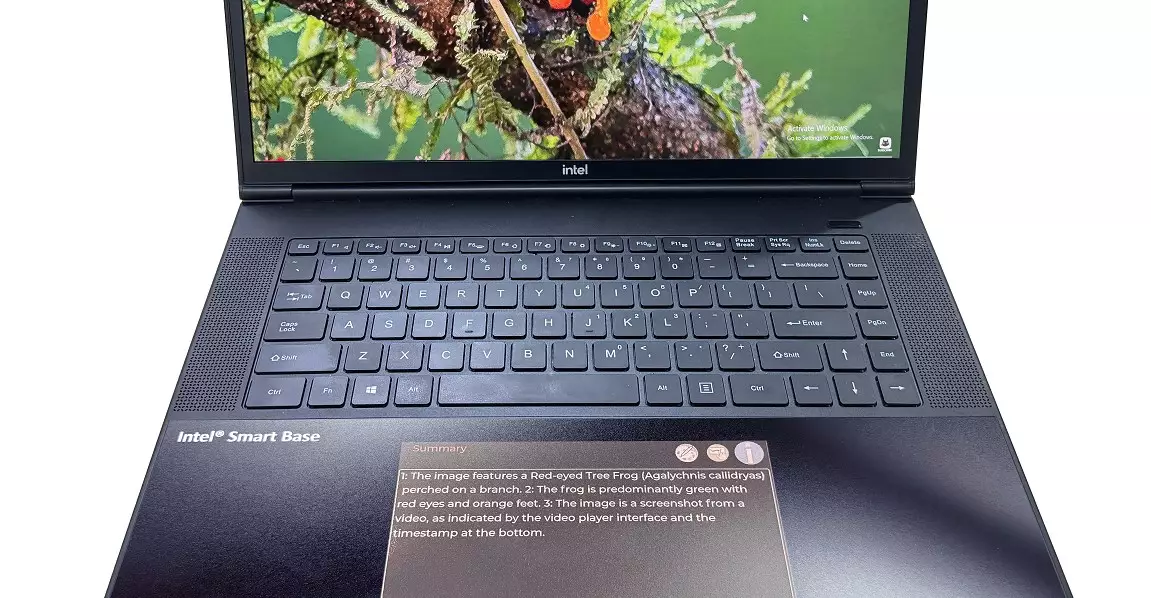
The landscape of laptop design is on the brink of a significant transformation, driven by advancements in display technology and an appetite for smarter, more efficient devices. E Ink, traditionally known for its e-reader screens, is boldly venturing into the realm of computation enhancement through its innovative touchpad concept. This development signifies more than a mere upgrade—it hints at a future where laptops could seamlessly integrate auxiliary displays dedicated to AI-driven tasks, offering users an unprecedented level of interaction and efficiency.
Unlike conventional touchpads or secondary screens that merely duplicate existing desktop content or serve as small, stagnant interfaces, E Ink’s vision champions a specialized, low-power display that functions as a dynamic hub for AI applications. This shift shifts the focus from multitasking within limited spaces to creating dedicated zones for intelligent tools that operate independently yet harmoniously with the primary display. The potential here is immense—imagine a work environment where AI-generated summaries or contextual information are constantly at your fingertips, unobtrusively displayed beneath your hands and never interfering with your core work.
Beyond the Limitations of Traditional Screens
The challenge with existing secondary displays, such as those seen in models from Asus or the now-defunct Touch Bar from Apple, is their reliance on small, often distracting LCD or OLED panels. These screens can distract the user, especially when they are colorful and capable of displaying rich media. More importantly, they tend to consume significant power, which exacerbates concerns about battery life—one of the most critical aspects of portable computing.
E Ink’s technology, however, offers a compelling counterpoint. Its signature static display mechanism is lauded for minimal power consumption—only drawing energy during content changes. This feature provides a way to keep the touchpad area active with useful information without draining the laptop’s battery. As AI tools grow more prevalent and power-hungry, this efficiency becomes a game-changer, potentially extending daily usage and reducing power anxiety.
Moreover, E Ink’s utilization of color displays—like those seen in Kindle Colorsoft—opens new avenues for visual engagement, enhancing the utility of the touchpad while avoiding the intense distractions of full-color LCDs. The technology is optimized mainly for text and simple graphics, aligning well with task-oriented applications such as notifications or quick controls, rather than media-rich content. Implementing these displays as dedicated AI helpers rather than simultaneous media screens shifts their role from mere supplementary visual elements to functional, context-aware interfaces.
Opportunities and Challenges Ahead
While the concept is captivating, it is not without its uncertainties. Critical technical details remain undisclosed, particularly concerning the resolution, color accuracy, and the integration of these displays within the laptop ecosystem. Does the new E Ink touchpad operate independently of the main OS, or will it function as an extension of existing interfaces? How will it handle complex interactions or multi-layered AI tasks? These are essential questions that will influence the effectiveness and user acceptance of this innovation.
The adoption of such technology also hinges on hardware manufacturers recognizing its potential and incorporating it into future designs. Concerns about cost, durability, and the user learning curve may pose obstacles in the early stages. Nonetheless, the strategic focus on energy efficiency and AI-centric functionality positions this as a potential game-changer for users who demand smarter, longer-lasting laptops.
In essence, E Ink’s pioneering effort signals a shift toward embracing specialized, low-power displays designed explicitly for AI and productivity enhancements. If realized well, this could redefine how users interact with their devices, transforming touchpads from passive input surfaces into intelligent work companions. The road ahead remains uncertain, but the promise of a more intuitive, efficient, and energy-conscious computing experience is undeniably compelling.
Leave a Reply